
Mastering the Delta T: Finding the "Ideal" ΔT for Your Server Racks
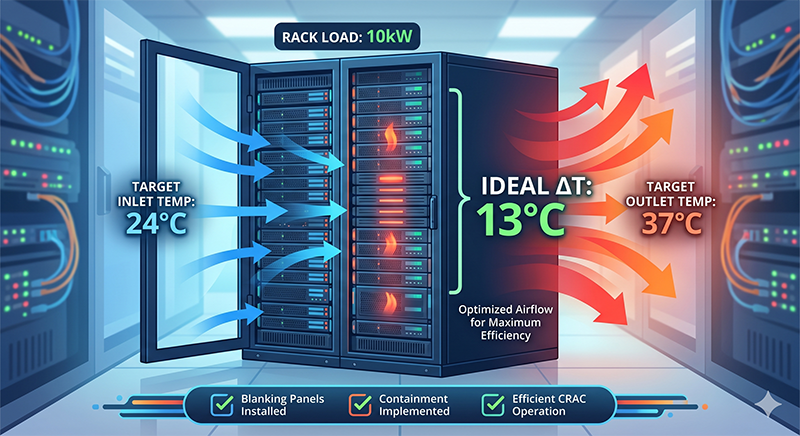
In the world of data center management, temperature isn’t just a number, it’s a metric of efficiency, hardware longevity, and operational cost. One of the most critical, yet often misunderstood, figures is rack ΔT (Delta T): the difference between the cold air entering the front of your rack and the hot air exiting the back.
If your ΔT is too low, you’re wasting money on over-cooling. If it’s too high, you’re risking hardware failure. So, is there an “ideal” ratio? Let’s dive into the physics.
What is the “Ideal” ΔT?
While there is no single universal ratio that applies to every data center, industry standards (and the physics of heat transfer) point to a specific “sweet spot.”
For modern high-density environments, the target ΔT typically falls between 11°C and 17°C (20°F to 30°F).
Why this range?
Server Design: Most enterprise servers are engineered to operate most efficiently within this temperature rise. Their internal fans adjust speed to maintain this internal thermal balance.
Cooling Plant Efficiency: Your CRAC (Computer Room Air Conditioner) or CRAH units are also designed for a specific ΔT. Efficiency is maximized when the ΔT of the racks matches the ΔT of the cooling system.
The Calculation: The Thermodynamics of a Rack
To understand how your rack is performing, you have to look at the relationship between power (heat generated) and airflow (heat removed).
The fundamental formula for metric calculations is:
If you want to calculate the expected ΔT based on your known power and airflow:
Case Study: The 10kW Rack
Let’s look at a common scenario: A 10kW rack with an inlet temperature of 24°C.
If we aim for the “goldilocks” ΔT of 13°C:
Inlet: 24°C (75°F)
Exhaust: 37°C (98.6°F)
Airflow Requirement: To maintain this, your servers need to move roughly 1,360 CFM (Cubic Feet per Minute) of air.
Scenario A: ΔT is too low (e.g., 5°C)
If your exhaust is only 29°C, you have Bypass Airflow. This means you are pumping more cold air into the aisle than the servers can actually use. This is “stolen” air that returns to the cooling unit without doing any work, forcing your fans to run harder than necessary.
Scenario B: ΔT is too high (e.g., 22°C)
If your exhaust is hitting 46°C, you have Recirculation. The servers aren’t getting enough fresh air and are likely re-ingesting their own hot exhaust. This leads to internal hotspots, fan speed spikes, and eventually, thermal throttling of the CPUs.
The calculator below can be used to find your required CFM or the expected ∆T sweet spot for your racks.
Rack Thermal Calculator
How to Optimize Your Rack’s ΔT
Achieving the ideal ΔT isn’t just about turning the AC up or down; it’s about Airflow Management (AFM).
Blanking Panels: These are the cheapest way to improve ΔT. They prevent hot air from leaking back to the front of the rack through empty U-spaces.
Containment: Whether it’s Hot Aisle Containment (HAC) or Cold Aisle Containment (CAC), physically separating the air streams ensures that the ΔT you measure at the rack is the same ΔT the cooling unit sees.
Brush Grommets: Seal the cable openings in the floor or the back of the rack to prevent “cold air leaks.”
Match the Load: If you have variable-speed fans in your cooling units, use sensors to floor-mount them so they provide only the CFM the racks are actually demanding.
The Bottom Line
A healthy ΔT is a sign of a well-balanced data center. For a 10kW rack at 24°C intake, look for an exhaust temperature in the mid-to-high 30s (°C).
By monitoring this delta, you stop “guessing” if your servers are cool and start “knowing” your facility is efficient.