
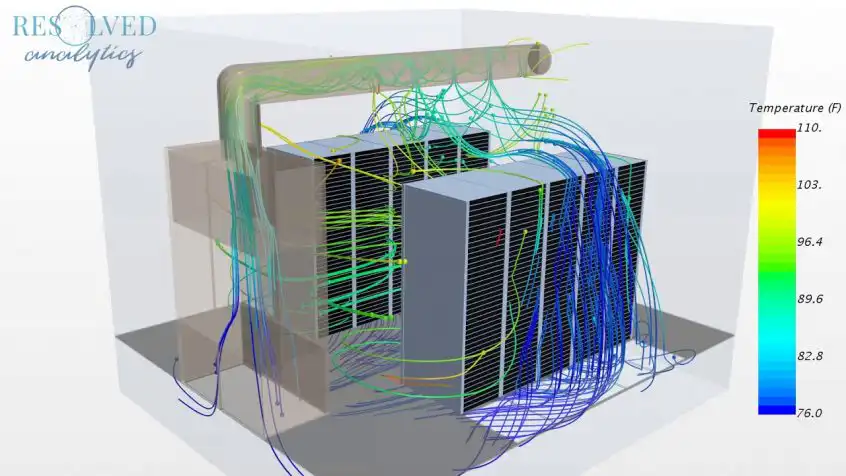
According to a recent Frost & Sullivan market research analysis, the data center market would be worth $432.14 billion per year by 2025. This is up from $244.74 billion in 2019, indicating a 10% annual growth rate. Datacenter operators, builders, and designers will expand their investment to leverage the deployment and use of IoT, Big Data, and AI. Emerging economies are predicted to grow rapidly, with the Asia-Pacific area leading the way. DatacenterComputational Fluid Dynamics analysis can help meet green data center targets while expanding their capacity.
This involves making energy and resource efficiency a top concern when developing and operating data centers. A slight boost in overall system efficiency can boost a data center asset’s return on investment significantly. Data centers have traditionally been extremely energy-intensive, with the majority of cooling provided by electricity-hungry chillers and other related equipment. The use of natural heat sinks such as the surrounding air or a water supply has become increasingly popular in recent years. To reduce energy demands for thermal management, many data centers have been built in cooler climes, and some net-zero data center operations even transfer extra heat to meet adjacent heat demands. Many data centers have been built in cooler areas to reduce energy demands for thermal management, and some net-zero data center operations even transfer extra heat to fulfill adjacent heat demands, such as houses and offices.
Driven By Simulation
Engineering Simulation On The Cloud
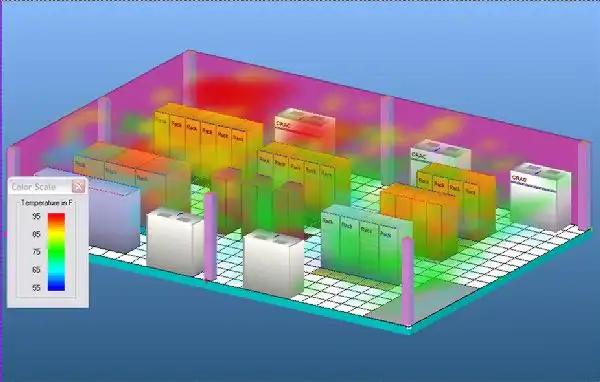 Computational Fluid Dynamics (CFD) is a sort of engineering simulation that simulates the behavior of fluids. To mimic the physical and thermal parameters of a data center setup, for example, a 3D model of a data center is employed. Computational Fluid Dynamics (CFD) can simulate the basic heat transfer mechanisms — conduction, convection, and radiation — and show how they affect the thermal performance of any building or piece of equipment. The approach is made possible by a cloud-based data center CFD simulation platform that can execute several simulations at the same time. This cuts down on the time it takes to thoroughly investigate all of the necessary scenarios within a problem domain, which can number in the hundreds. All conceivable design situations can be simulated at the same time using parallel run capabilities. Computational Fluid Dynamics CFD is helpful in gaining a better understanding of:
- Existing designs’ flow characteristics expose inefficiencies. Recirculation and isolation zones between aisles, or CRAC units, for example.
- Temperature distribution across different sites.
- The temperature of the equipment.
- Zones or hotspots are identified.
- What-if scenarios and design tweaks are compared.
Computational Fluid Dynamics (CFD) Simulation Best Practices
Make Sure Your Setup Is Correct
Gradually Increase The Level Of Complexity
Make the Most of Your Monitoring Software
Enlist The Help of the Experts
Allow it to be alone
Benefits of data center Computational Fluid Dynamics Simulation
Obstructions Within The Cabinet
Cabling or other obstructions can impede the flow of air causing high-temperature differentials between the inlet and outlet temperatures. The cabinet analysis sensor with pressure differential can also help analyze airflow issues.
Server And Cooling Fan Failures
As fans age, or fail, the airflow over the IT equipment will lessen. This leads to higher temperature differentials between the front and rear.
Insufficient Pressure Differential To Pull Air Through The Cabinet
When there is an insufficient pressure differential between the front and rear of the cabinet, airflow will be less. The less cold air flowing through the cabinet, the higher the temperature differential front to rear will become.
Power Usage Effectiveness (PUE)
When the data is combined with the power consumption from the in-line power meter you can safely make adjustments in the data center cooling systems, without compromising your equipment, while instantly seeing the changes in your PUE numbers.
ACKP Sensors And Central Monitoring
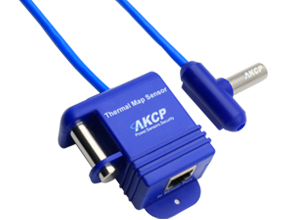 Wired and Wireless Thermal Map Sensors
Sensors placed in the room or on individual cabinets have traditionally monitored the temperature and humidity within data centers. The Thermal Map sensor, wired or wireless, is a three-in-one sensor that monitors temperature and humidity at the top, middle, and bottom of your server cabinet. Designed to be installed at the rack’s front air inlet, with a second sensor installed at the back air outlet.
AKCPro Server
AKCPro Server is our world-class central monitoring and management software. Suitable for a wide range of monitoring applications. Free to use for all AKCP devices. Monitor your infrastructure, whether it be a single building or remote sites over a wide geographic area. Integrate third-party devices with, Modbus, SNMP, and ONVIF compatible IP cameras.
Monitor all your AKCP devices
All deployed AKCP base units and attached sensors can be configured and monitored from AKCPro Server (APS). Base units communicate with the server through your wired local network (LAN) or wide area network (WAN). Remote sites with no wired network send data to the server through the cellular data network via a VPN connection.
Conclusion
Reference Links
- About the Author
- Latest Posts

For over two decades at AKCP, I have been focused on a single mission: bringing complete visibility, security, and efficiency to the world’s critical infrastructure.
I believe that in the modern data center, AI is only as good as the data it receives. My goal is to ensure facilities have the precise sensor facts needed to control AI opinions, ultimately reducing PUE, releasing stranded capacity, and ensuring maximum uptime.