
Home » AKCP Blog » Monitoring Solutions for Edge UPS Problems in Modern Data Centers
Monitoring Solutions for Edge UPS Problems in Modern Data Centers
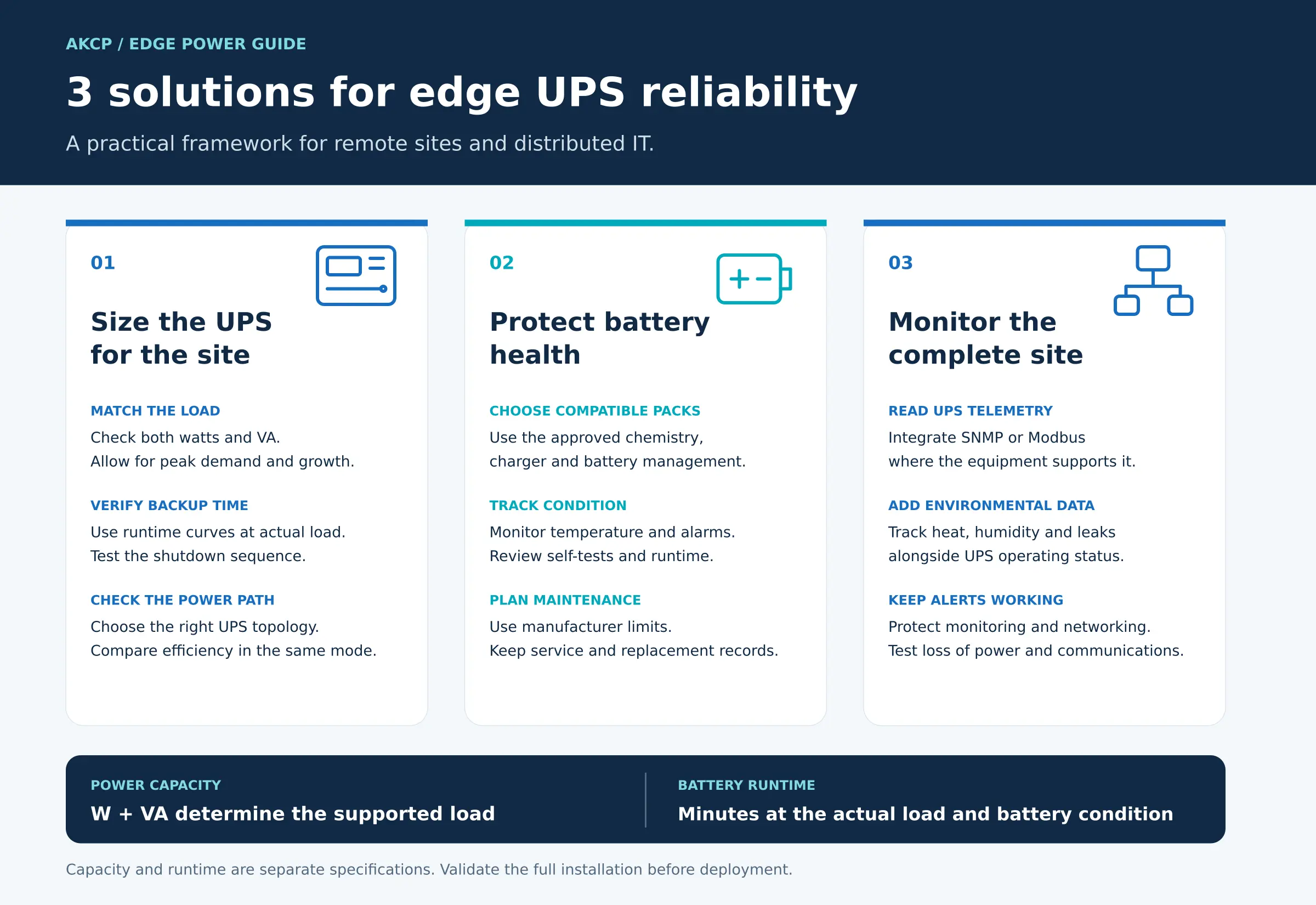
An edge uninterruptible power supply (UPS) keeps local IT equipment running when utility power fails. Reliable backup power depends on three things: choosing a UPS that matches the load and power conditions, maintaining a healthy battery system, and monitoring the UPS status and performance.
Edge sites, such as network closets, retail branches, industrial sites, and small data centers, all need backup power systems. Monitoring the battery health is essential. Remote visibility helps operators act before the next outage exposes the problem.
The three solutions below explain how to improve edge UPS reliability and how AKCP monitoring can support the process.
Why edge UPS systems need more than battery backup
An edge site often has limited rack space, shared cooling, and a single network connection. It may support servers, storage, routers, security equipment, and Power over Ethernet (PoE) switches. Losing one component can interrupt the entire service, even when the server itself still has power.
If you add new loads to a site, you must review the measured load after installation. Otherwise, an installation with comfortable headroom at commissioning may eventually approach its UPS limit.
Treat the UPS as part of the site’s power and communications design. Identify which equipment must remain available, how long it must run, and what should happen if utility power does not return.
Solution 1: Choose the right UPS topology, capacity, and efficiency
Match power protection to the site
UPS topology describes how the system supplies and conditions power. The appropriate choice depends on power quality and the connected equipment’s tolerance for interruptions.
UPS topology | How it supplies power | Typical application |
| Standby or offline | Transfers from utility power to battery when input conditions require it | Basic backup for suitable low-criticality devices |
| Line-interactive | Regulates utility voltage and transfers to battery when necessary | Network closets and distributed IT with reasonably stable utility power |
| Online double-conversion | Continuously converts AC to DC and back to AC while operating in double-conversion mode | Sensitive or critical equipment and sites with poor power quality |
Size the UPS in watts and VA
Check both the real-power rating in watts (W) and the apparent-power rating in volt-amperes (VA). The connected load must remain within both limits. Two UPS units with the same VA rating can have different Watt capacities.
Include every protected device in the calculation. For PoE switches, account for the switch and the power it delivers to connected devices. Allow for anticipated growth and peak demand, then confirm the available electrical circuit, connectors, rack depth, weight and ventilation.
Specify runtime separately from power capacity
Power capacity tells you how much equipment the UPS can support. Runtime tells you how long its batteries can support that equipment. Use the manufacturer’s runtime curve for the measured load and installed battery configuration. DOn’t forget to account for battery aging.
For critical sites, also consider a maintenance bypass and a redundant power arrangement. Verify that each remaining power path can carry the required load after a failure. Connecting both server power supplies to one UPS makes that UPS a single point of failure.
What is your UPS backup power goal? Is it to bridge a short outage, wait for a generator to stabilize, or give applications time to shut down cleanly? For example, a site without a generator may need a tested shutdown sequence that finishes before the batteries are exhausted.
Compare efficiency at the actual load
Compare efficiency in the operating mode you intend to use, at realistic load levels. A peak efficiency figure or an ECO-mode figure alone does not describe the energy losses of an online UPS running continuously in double-conversion mode.
Some newer UPS designs use wide-bandgap power semiconductors, including silicon carbide (SiC), to reduce conversion losses and improve power density. This is a power-electronics technology; its benefit depends on the complete UPS design. Check the finished product’s specifications rather than assuming a particular semiconductor guarantees a smaller or more efficient UPS.
Solution 2: Choose and monitor the battery system
Compare VRLA and lithium-ion batteries
Valve-regulated lead-acid (VRLA) batteries remain a practical UPS option. Smaller VRLA systems commonly have an expected battery life of three to five years, but heat and frequent cycling can shorten service life. Larger battery systems may have different design-life ratings.
Lithium-ion UPS batteries can reduce replacement frequency and installation weight. For example, Vertiv lists an eight-to-ten-year battery design life for its Liebert GXT5 Lithium-Ion family. That is a product rating, not a universal service-life guarantee for every lithium-ion UPS.
Compare the battery chemistry, operating limits, warranty, replacement availability, and total service cost. A longer-lasting battery may justify a higher initial purchase cost at a remote site where each replacement requires travel and downtime planning.
Lithium-ion batteries require a compatible battery management system (BMS) and charging arrangement. Use only battery packs and configurations approved for the UPS. Replacing a VRLA pack with an unapproved lithium-ion pack can create charging and protection problems that can be a dangerous fire hazard.
Monitor temperature and performance trends
Battery charge percentage shows the state of charge. It does not prove that an aging battery will provide the required runtime. Review self-test results, battery alarms, temperature, and runtime estimates together. Follow the manufacturer’s procedure for periodic performance verification.
Monitor the temperature around the battery installation and, where supported, battery temperature itself. Look for sustained heat, changes from the established baseline, and differences between comparable batteries. Set thresholds from the battery manufacturer’s limits and commissioning data. A fixed temperature difference between battery and room is not a universal pass-or-fail rule.
For accessible battery terminals, the AKCP Battery Terminal Temperature Sensor measures at the negative terminal. AKCP also offers a Battery Health Sensor to monitor voltage, temperature, and current in compatible battery and DC power systems.
Include battery safety in the site design
Lead-acid battery installations can release hydrogen, so ventilation and any gas detection must suit the battery arrangement and installation requirements. Lithium-ion failures can involve heat and hazardous gases; their detection strategy must suit the specific battery system.
Select dedicated detection equipment for the required hazard. General air-quality readings do not establish that a system can detect hydrogen or provide lithium-ion thermal-runaway warning. Integrate suitable detector alarm outputs into monitoring where supported, while retaining the required local safety systems and response procedures.
Solution 3: Combine UPS telemetry with environmental monitoring
Collect operating data through SNMP or Modbus
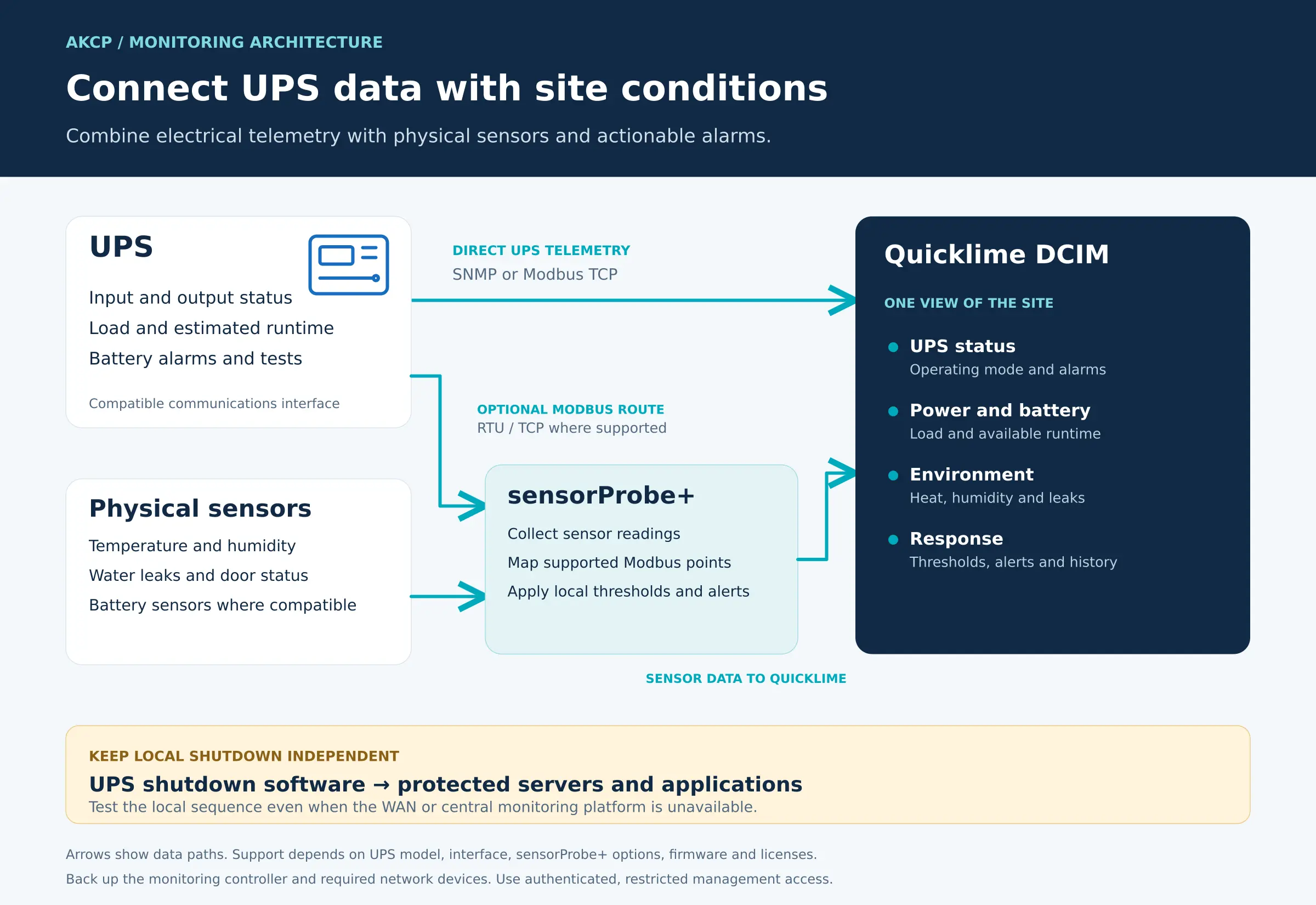
A network management card or communications interface can expose UPS status to a monitoring platform. Available protocols and data points vary by UPS model, card, firmware, and license.
AKCP Quicklime DCIM supports monitoring of third-party systems through protocols including SNMP and Modbus. Compatible sensorProbe+ configurations can also monitor third-party Modbus RTU or TCP data through virtual sensors. Verify the specific integration and hardware options when designing the system.
Common UPS monitoring points include the following, where the device exposes them:
Monitoring point | Operational purpose |
| Input voltage and frequency | Identify supply disturbances and recurring instability |
| Output power and load percentage | Track capacity headroom and overload risk |
| On-battery and bypass status | Show changes in the UPS operating state |
| Battery charge and estimated runtime | Support outage response and shutdown decisions |
| Battery temperature and health alarms | Flag conditions requiring investigation |
| Self-test result and replacement indication | Help prioritize maintenance |
| Communications status and last update time | Detect lost visibility or stale readings |
Obtain the correct SNMP Management Information Base (MIB) or Modbus register map. Validate units, scaling and status values against the UPS display. A missing or unavailable measurement should appear as unknown or offline, rather than as a healthy zero value.
Use periodic polling to establish current state, with event notifications such as SNMP traps where supported. Test alarm delivery and recovery messages during commissioning.
Monitor the conditions around the UPS
A UPS alarm may reveal an electrical problem without explaining its environmental cause. Combine its telemetry with cabinet temperature, humidity, water-leak detection and relevant door or cooling-system status.
Quicklime can display AKCP sensor data alongside third-party UPS information, with thresholds, alerts, graphs, reports and data center visualization. This helps operators examine related events in one place.
For example, if cabinet temperature rises after a cooling failure, an operator can check the UPS load and battery temperature before deciding whether to dispatch maintenance or begin a controlled shutdown. The response should follow the site’s documented operating procedure.
Keep alerts useful during an outage
Power the monitoring controller, necessary switches and communications equipment from a protected supply. Where the site requires it, consider a separately powered cellular communications path. Test what happens when both utility power and the primary WAN connection fail.
Central monitoring and shutdown control have different roles. Configure local UPS shutdown software or another tested control mechanism to act safely if the central platform is unreachable. A dashboard alone cannot guarantee an application shutdown.
Define who receives each alarm, how quickly they must respond and when it escalates. Useful triggers include runtime below the site’s shutdown reserve, sustained overload, an unexpected bypass state, battery faults and loss of communications. Use appropriate delays or hysteresis to limit repeated notifications around a threshold.
Secure the monitoring connection
Place UPS management interfaces on a controlled management network. Use SNMPv3 with authentication and encryption where supported, restrict polling to authorized systems and keep management-card firmware maintained. Use read-only access for routine monitoring and separate permissions for control actions.
Protect remote administration with the organization’s approved access method. Confirm the required protocol support and licenses; for example, AKCP documents SNMPv3 as a licensed feature on applicable sensorProbe+ configurations.
A practical checklist for edge UPS reliability
- Record the protected equipment, measured peak load and both W and VA requirements.
- Select the UPS topology, operating mode and battery configuration for the site.
- Verify runtime against generator start time or the tested shutdown sequence.
- Establish a baseline for battery condition, temperature and UPS load.
- Map and validate the UPS data points in the monitoring system.
- Test power-loss, low-runtime, battery-fault and communications-loss alerts.
- Assign maintenance responsibility and record test and replacement dates.
Monitor your edge UPS with AKCP
Combine compatible UPS telemetry, AKCP environmental and battery monitoring sensors and Quicklime DCIM to improve visibility across your edge sites. Contact AKCP with your UPS model, battery configuration and communications interface to discuss the available monitoring options.
Frequently Asked Questions
What is the best UPS for an edge data center
The best UPS matches the site’s load, power quality, required runtime and service constraints. Online double-conversion designs suit sensitive loads and poor utility power. A suitable line-interactive UPS can be appropriate for less demanding sites with stable power.
How long do UPS batteries last
Smaller VRLA UPS batteries commonly last three to five years under suitable conditions. Some lithium-ion UPS products have battery design-life ratings of eight to ten years. Actual service life depends on the product, temperature, cycling and maintenance.
Can a UPS be monitored remotely using SNMP or Modbus
Yes, when the UPS provides a compatible interface and the monitoring platform supports it. Confirm the management card, protocol settings and available data points before commissioning. Quicklime DCIM supports integrations using SNMP and Modbus.
Is battery charge percentage enough to assess UPS health
No. Assess charge alongside battery alarms, test results, temperature and demonstrated runtime. A battery can report a full charge while its usable capacity has declined.
Can remote monitoring replace UPS maintenance
Remote monitoring helps identify problems and prioritize service visits. Battery replacement, physical inspection and repairs still require appropriate on-site work.
- About the Author
- Latest Posts

Nicholas Barrowclough( President )
For over two decades at AKCP, I have been focused on a single mission: bringing complete visibility, security, and efficiency to the world’s critical infrastructure.
I believe that in the modern data center, AI is only as good as the data it receives. My goal is to ensure facilities have the precise sensor facts needed to control AI opinions, ultimately reducing PUE, releasing stranded capacity, and ensuring maximum uptime.
- Monitoring Solutions for Edge UPS Problems in Modern Data Centers
- Data Center Power Monitoring When the Megawatts Move On-Site
- AKCP Launches IPSet Mobile App for Fast sensorProbe+ Network Configuration
- Battery Room Ventilation Requirements: The Two Compliance Paths and the Monitoring That Proves Both
- Environmental Monitoring Systems (EMS): The Complete Guide for Modern Infrastructure