AKCP Introduces Free Quicklime Tier for Server Room Monitoring
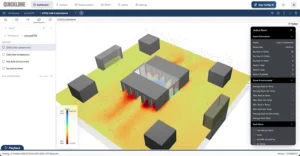
Quicklime sensorCFD
AKCP has introduced a free tier of Quicklime, its monitoring and data center infrastructure management software, giving organizations a practical starting point for monitoring smaller installations without a paid software license. The latest Quicklime installers include the free tier, which provides capacity for 10 sensors, one rack, one camera, and three access control users. Following the three-month trial, customers can continue using Quicklime within these free-tier allowances.

UPS System Design Tools
Battery Room Monitoring: The Gases, Temperatures and Signals That Precede a UPS Failure
An uninterruptible power supply (UPS) provides essential backup power for data centers, server rooms, telecommunications equipment and other critical systems. During a mains failure, it keeps equipment operating while power is restored, a generator starts, or systems complete an orderly shutdown. Effective planning means understanding both the power your UPS can deliver and how long its batteries can sustain the connected load.
Data Center Airflow Calculator: CFM & Rack Cooling | AKCP
data center airflow calculator
A 10 kW rack needs approximately 1,463 CFM, or 2,485 m³/h, to carry away its heat at a 12°C temperature rise under the AKCP calculator’s standard-air assumptions.Change the load or temperature rise and the airflow requirement changes with it. That makes a single “CFM per rack” figure a poor basis for planning.
Rack Power Calculator and PDU Capacity Planning | AKCP
Server rack with dual A/B power feeds illustrating rack power capacity and failover planning.
A rack may have room for another server and still be close to its electrical limit. The problem often appears during maintenance or a power failure, when one PDU has to carry equipment that normally shares its load between two feeds. The AKCP Rack Power and PDU Capacity Calculator helps you check that scenario before adding equipment. Enter the rack load, each feed’s electrical ratings and a growth allowance to estimate usable capacity, expansion headroom and the load on a surviving feed. You can also check measured phase currents and estimate rack heat output and electricity costs.
Chilled Water Flow Calculator for Data Centers | AKCP
AKCP chilled water flow calculator header showing data center racks, insulated piping and a circulation pump.
Chilled water flow depends on the heat carried by the loop and the temperature rise between supply and return. For plain water, a useful metric estimate is flow in L/s = cooling duty in kW ÷ (4.18 × ΔT in °C). A 100 kW load at 5°C ΔT needs approximately 4.8 L/s, or 76 US GPM. That calculation is a useful starting point when checking a CRAH coil, reviewing a chiller circuit or planning a liquid cooling connection. It also explains why a plant can become short of available flow even when the installed cooling capacity appears sufficient: the operating
Data Center Dew Point Calculator | AKCP
Data center dew point and humidity calculator header showing condensation on a cooling pipe beside server racks.
A data center can have a comfortable room temperature and an apparently reasonable humidity reading while a cold pipe is close to collecting water. The missing measurement is often the temperature of the surface itself. Condensation risk depends on how close that surface is to the dew point of the surrounding air. As liquid cooling adds pipes, fittings and coolant distribution units to the data hall, this comparison becomes an increasingly useful part of routine environmental checks.
Data Center Cooling Load Calculator: How Much Cooling Do You Need?
AKCP data center cooling load calculator header showing server racks, cooling airflow and capacity controls.
A row of new servers arrives, the rack power budget goes up, and someone asks whether the existing cooling can cope. The room may feel cold. The air conditioners may still have capacity on paper. Neither tells you how much heat the new equipment will produce, or whether enough cooling will reach it.
UPS Battery Recharge Time Calculator for Outage Recovery
UPS and battery cabinets with charging and clock icons, illustrating battery recharge time after an outage.
When utility power returns, the UPS may resume normal operation before its batteries have recovered their previous backup capability. If another outage follows soon afterwards, the available runtime can be much shorter.
UPS Efficiency and Cost Calculator for Comparing Electricity Use
UPS cabinets with electricity and cost icons, illustrating energy efficiency and operating cost comparison.
A small difference in UPS efficiency can produce a measurable electricity saving when the system runs throughout the year. To calculate it properly, use the efficiency at the load and operating mode you expect, then work out how much input power is required to deliver that output.
UPS Shutdown Timing Calculator for an Orderly Shutdown
UPS and server racks with clock and power icons, illustrating orderly shutdown timing.
A UPS can keep equipment powered while a shutdown command is being delivered, but that does not mean the shutdown will finish in time. Applications, virtual machines, storage and hosts may need several minutes to stop in the correct order. Detection and control delays also consume the runtime budget.

Schedule a Demo With Us

Find out how we can Protect, Monitor and Optimize your Data Center

AKCP data center monitoring sensors

Interested in our FREE Data Center PUE check?

Contact us below and schedule a 15 minute consultation

Thank you for your submission!

One of our team members will reach out within 24 hours.

Contact AKCP